Wednesday, February 29, 2012

Hands-On With Toshiba AT270 Tablet

Toshiba isn't at the Mobile World Congress in Barcelona, but we still caught a glimpse of one of the company's upcoming tablets. I managed to get a hands-on with Toshiba's AT270 (at least, that's what the tablet is identified as by the Android Operating System) at the Nvidia booth.
The AT270 sports Nvidia's Tegra 3 chip, which is why Nvidia was showing off the tablet at its booth. Toshiba showed several prototype tablets at CES 2012, this 7.7-inch model among them.
The 7.7-inch AT270 I played with at MWC feels more real than the prototype I handled at CES. The buttons are well-crafted, and the back is made of pleasingly-textured molded plastic. Along the bottom vertical edge is the headphone jack, a microUSB port, and a microSD card slot. The camera is at the upper right corner. While I don't have the actual specs on this tablet, I can say it's slim and lightweight and--most importantly--feels comfortable for extended one-handed use.
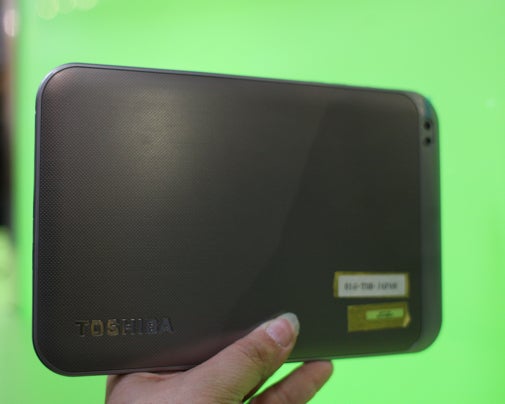
Toshiba's display appears to have beautiful colors--not surprising, since it's using a 1280 by 800 pixel super-AMOLED screen. Text looks sharp and crisp, as it does on Toshiba's current 7-inch Thrive. The AT270 is expected to replace the current Thrive, at an as-yet undetermined date.
Nvidia also notes that Toshiba's upcoming 13-inch tablet will also be powered by the Tegra 3. Toshiba says that model, shown in rough prototype form at CES, will have a wide viewing angle display and weigh around 2 pounds. The back of the model shown at CES was made of aluminum and the display resolution was not final. The reference design shown at CES ran Android, but Toshiba implied the tablet could, in the future, run Windows 8.
Toshiba is just one of the many tablet makers looking to use different mobile CPUs for different tablets. The company's Excite X10, which was introduced at CES, has a Texas Instruments OMAP processor.
"It's going to vary by product," says product manager Phil Osako.

For more blogs, stories, photos, and video from the world's largest mobile show, check out 
PCWorld's complete coverage of Mobile World Congress 2012.

Quoted from "PCWORLD"

Apple's March 7 iPad 3 Event: 5 Things to Watch For


Apple's March 7 iPad 3 Event: 5 Things to Watch ForApple has made its March 7 iPad event official with an invite to the press, promising "something you really have to see. And touch."
Of course, Apple's not providing any more details, but that hasn't stopped the tech press from coming up with plenty of rumor and speculation. Even the name "iPad 3" is just shorthand for "next tablet Apple will announce." Here's what I'd look for at next week's event:

iPad 3 Rumored Tech Specs

The most likely feature for Apple's iPad 3 is a "Retina" display, or at least a screen with double the resolution of the iPad 2, at 2048 pixels by 1536 pixels. The upgraded display, combined with 4G LTE connectivity, may actually result in a slightly thicker frame than that of the iPad 2. For a processor, Apple watchers expect to see either a quad-core A6 processor inside the iPad 3, or a dual-core A5X.

The Vanishing Home Button?

The invite Apple sent for its event, which shows a small section of an iPad, has some tech bloggers in a tizzy because there's no home button on the iPad's bezel. But supposed pictures of the iPad 3'sfront glass panel shows the round home button intact, and it's possible that the image Apple sent is showing the side or the top of the device. I think the home button is sticking around.

Siri Says Hello?

Apple SiriApple SiriA report last week on Apple.pro, a Chinese blog, suggested that Apple will bring the Siri virtual assistant to the iPad 3. This hasn't been a recurring rumor, but it seems plausible.

iPad 2 Price Drop

Best Buy has already dropped the price of the iPad 2 by $50 for all models, but last year, Apple slashed the original iPad's price by $100 after releasing the iPad 2. Once the new iPad launches, I'm guessing last year's model will get its own $100 price drop at all retailers--while supplies last.

Other Stuff: New Apple TV, iPods?

Earlier this month, the Apple TV set-top box sold out at Best Buy's Website, and it was no longer listed at Walmart. That led to speculation that a new Apple TV will replace the old set-top box, possibly with 1080p video support. The Apple TV box is not to be confused with the rumored Apple television, which probably isn't anywhere close to being finished.
I also noticed that Best Buy is having a sale on iPods. While there's not much buzz about an iPod refresh in the tech world, Apple hasn't updated its line of media players since September 2010. They're overdue for a facelift.

Quoted from "PCWORLD"

Sunday, February 26, 2012

iPad 3 Display: A Possible Peek


The screen in Apple’s next-generation iPadis said to be a standout feature of the tablet, and an analysis of what is purportedly one of those new screens supports the growing expectations.
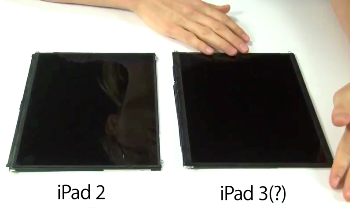
Repairs website iFixit analyzed a screen obtained obtained earlier this month byMacRumors, which says the screen is that of an iPad 3, and confirms the unit has double the resolution of the iPad 2 screen.
An iPad 3 announcement is expected on March 7, and several leaks of the display indicate it will have double the resolution of the iPad 2. iFixit's analysis, available as a video, is of note because the people behind the online teardowns of most new gadgets are verifying the quality of the display. MacRumors isn't saying how it obtained the screen, but claims it is from an iPad 3.
Put under the microscope, the alleged iPad 3 display has double the linear resolution of the iPad 2 -- from 1024 by 768 pixels to 2048 by 1536 pixels -- which is higher than full 1080p HD video resolution at 1920 by 1080 pixels, and should display much sharper images. The improvement would be similar to the difference between a 3.5-inch iPhone 3GS display and the double-resolution iPhone 4/4S screen.
If this is indeed the type of display used in the new iPad, it will be interesting to see whether Apple will use the same Retina moniker it used for the double-resolution iPhone display. As my colleague Matt Peckham points out, in Apple’s book, Retina refers to displays with pixel density of more than 300 ppi (pixels per inch). At 9.7 inches and double the current resolution, an iPad 3 display would have just over 260ppi.
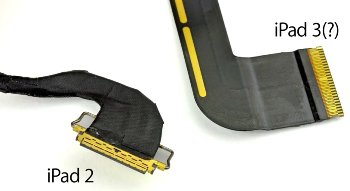
iFixit couldn't power up the screen with iPad 2 hardware, as the current iPad display uses a different connector than the one MacRumors obtained. This suggests that the new display will have different power requirements, and will hamper modders from getting a higher-resolution display with thieir older tablets. But take a look for yourself.

Quoted from "PCWORLD"

Saturday, February 25, 2012

DOWNLOAD ! USB SAFELY REMOVE 5 FINAL (Full Version)


USB Safely Remove is a USB device manager.


USB Safely Remove saves time and extends user abilities on active work with flash-drives, portable drives, card readers and and other gadgets.


USB Safely Remove gives a handy safe removal, devoids of annoyances of the native Windows tool, displays what programs prevent stopping a device, hides drives of empty card reader slots, allows to return a stopped devices back and has many other features for comfortable work with hot-plug devices (USB, SATA, Firewire, PCMCIA).


Here are some key features of "USB Safely Remove":

· Safely remove in one click!
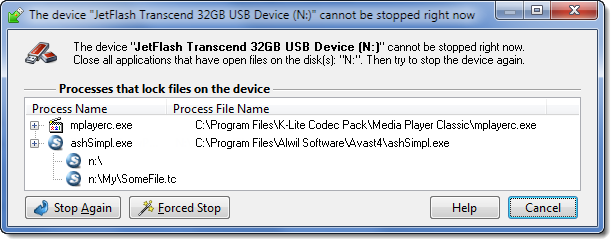
· Displaying processes which are preventing USB device from being stopped
· Powerful command line support
· 3 methods to stop devices.
· Automatically assigning hotkeys.
· Forbidding stopping any device.
· Customizable names and descriptions for devices.
· Notifications about connecting/disconnecting devices with the help of a balloon tooltip.
· Playing sounds or running external programs when devices are connecteddisconnected.
· Restricting access to the features of the program with a password.
· Loading custom images for devices
· Ability to operate SATA drives

Requirements:

· 10 MB RAM
· 10 MB HDD space
· USB support


Here Some Screen Shot :


Right Click Feature

Unlocker Windows

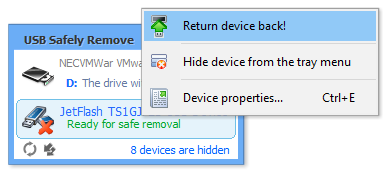
Return Device Back!
One Hotkey for Stopping


DOWNLOAD Installation + Crack Here!

DOWNLOAD ! Trend Micro Titanium Internet Security 2012 Full Version!


Trend Micro Titanium is powered by the Trend Micro Smart Protection Network infrastructure, our cloud security infrastructure that stops threats in cyberspace or "the cloud." Smart Protection Network monitors the Internet 24/7, worldwide.


It gathers and analyzes threat data, blocking viruses and other malware BEFORE they can reach your PC. And because processing is done in the cloud, Titanium uses less of your PC’s memory and disk space, so it won’t slow you down.


You will be able to securely send emails, make payments and bank transactions, and even share photos online, resting assured that your privacy and documents are protected by Trend Micro Titanium Internet Security.


Titanium Internet Security Gives You What You Want:
Strong protection — uses cloud security technology and real-time antivirus scanning to defend you immediately, without waiting for updates and downloads
Easy to use and understand Internet security — has friendly display screens and set-it-and-forget-it simplicity
Light demands on your PC’s resources — has a small "footprint" so it doesn’t affect computer performance


Key Features and Benefits Include:
Cloud technology — leverages the Trend Micro Smart Protection Network plus real-time antivirus scanning to provide always-on Internet protection to keep you safe from the latest and ever-evolving malware threats
Automatic protection — removes the guesswork of protecting your PC, intelligently and immediately reacts to threats
Simple installation — it takes just a few clicks
Streamlined interface — it is easy to understand and simple to manage

Strong Antivirus Protection Made Simple:
· From the main Titanium Internet Security console screen, you can easily run an antivirus scan or get up-to-the-minute status reports on your computer’s security.


Easy-to-Understand Security Reports:
· Easy-to-read graphic reports provide you with all the details about the Internet threats that attack your computer. You can drill down into detailed security logs with just one click.


Friendly, Adjustable Parental Controls:
· Without having to look over their shoulders, you can easily protect your children from inappropriate websites, limit their time on the Internet, and see detailed activity reports about what they do online. The Parental Controls can be quickly customized.


Data Theft Prevention:
· Prevent hackers and spyware from stealing credit card numbers, passwords, email addresses, and other sensitive data.

Requirements:


· Windows 7 Family, Service Pack 1 or higher: CPU 1 GHz, Memory 1 GB, Disk Space 500 MB
· Windows Vista Family, Service Pack 1 or higher: CPU 800 MHz (1 GHz recommended), Memory 512 MB (1 GB Recommended), Disk Space 500 MB
· Windows XP Family (32 bit), Service Pack 3 or higher: CPU 450 MHz (800 MHz recommended), Memory 256 MB (512 MB Recommended), Disk Space 500 MB
· Web Browser: Microsoft Internet Explorer 7.0 or 8.0
· Display: High-color display with a resolution of 640x480 pixels or higher
· PDF Reader: Any
· Internet Speed: Broadband or equivalent recommended

DOWNLOAD Installation x32 bit Here!


DOWNLOAD Installation x64 bit Here!


DOWNLOAD Key for Full Version Here!